About GropyusGropyus is a technology-driven construction company focused on industrialised, sustainable housing.
By combining digital planning, automated production, and timber-hybrid construction, Gropyus delivers high-quality housing with greater efficiency, scalability, and reduced environmental impact.
Early planning decisions directly affect cost, approvals, production, and construction.
The product
A web-based, desktop-first internal drawing tool embedded in Gropyus’ planning-to-production workflows, designed around frontend-heavy, CAD-like interactions to support early planning with production-level accuracy.
My role
As Senior Product Designer, I owned the end-to-end drawing experience, shaping complex workflows and translating architectural processes into clear and usable interactions.
The team
A cross-functional group of product manager, FE as well as full stack engineers, working closely to align planning needs with technical feasibility and downstream production systems.
The target audience
The tool was built for 8 / 10 internal execution architects,, CAD-proficient domain experts working daily on production-bound projects, where accuracy directly impacts approvals, cost, and construction.
Intro
Insights & design principles
Through stakeholder interviews, shadowing sessions, and early validation, we uncovered a key gap in Gropyus’ planning phase. Existing architectural tools failed to balance fast iteration with production-level accuracy, leading to late changes and downstream inefficiencies.
Business needs
Own the end-to-end digital workflow from planning to production
Reduce reliance on external CAD / BIM tools
Ensure early decisions are technically valid and production-ready
Support scalability, traceability, and long-term platform growth
User needs
Architects & Planners
Create layouts quickly and accurately
Iterate early concepts with low setup overhead
Trust outputs to respect architectural and structural logic
Internal Stakeholders
Make earlier, better-informed decisions
Downstream Teams
Receive consistent, reliable inputs
Minimise late-stage changes and reinterpretation
Design principles
Speed with intent
Enable fast iteration without sacrificing correctness.
Progressive precision
Start simple; increase accuracy as decisions mature.
Constraints as guidance
Prevent invalid states while preserving exploration.
Familiar over novel
Leverage CAD mental models to reduce cognitive load.
Decisions that scale downstream
Every planning action must remain usable beyond planning.
Problem space
Initial wireframes
Early wireframes sparked discussion and validated direction, helping us identify what mattered most to users and define a clear MVP feature set. In parallel, they served as a shared reference for technical feasibility, resourcing, and timeline alignment, supporting informed planning early on.
Solution space
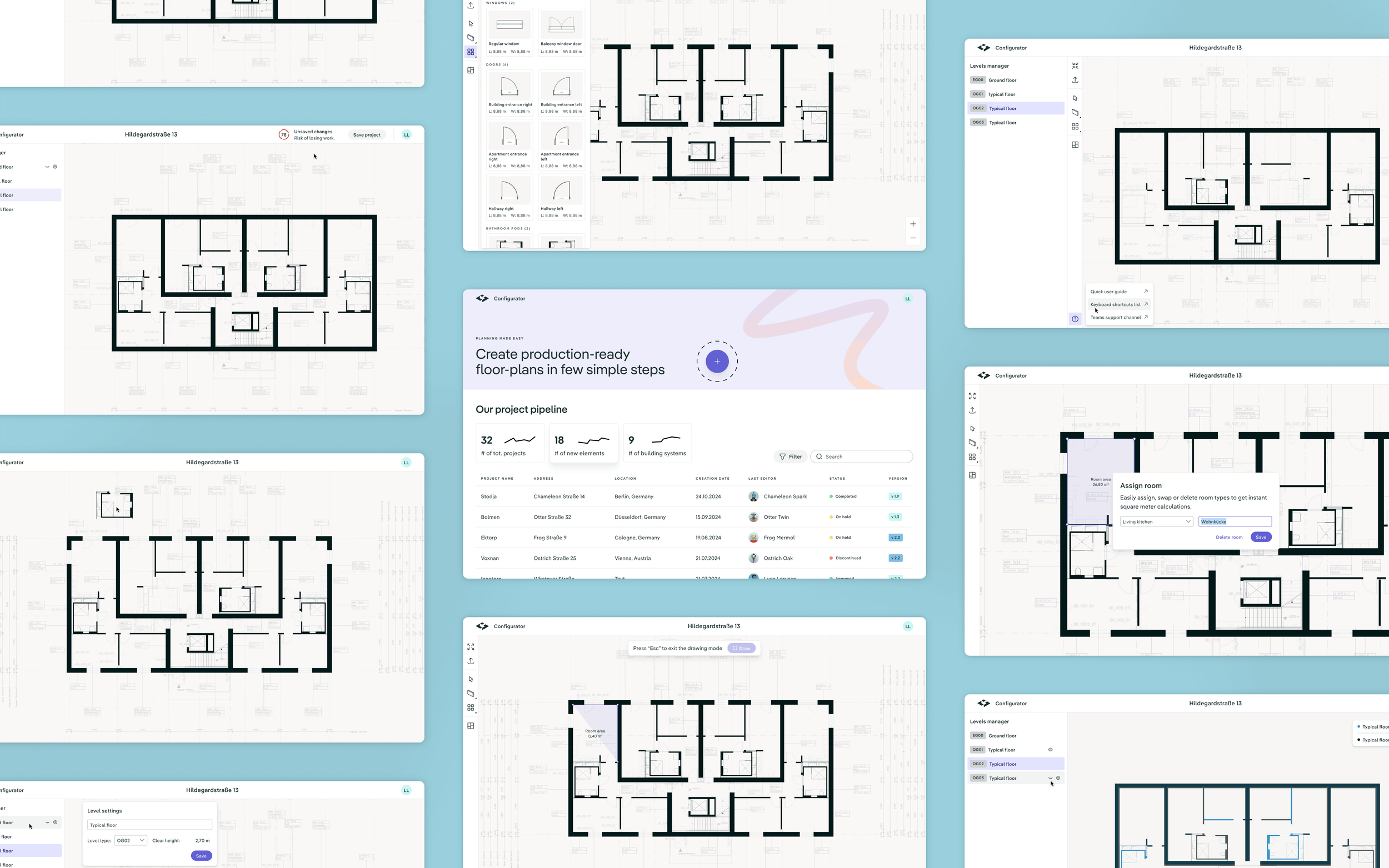
Some core features
Research and discovery helped us narrow the solution space to a set of essential MVP features. The following screens showcase the core capabilities users relied on to create accurate and standard floor plans.
Import PDF plans flow
Tracing walls over the uploaded floorplan
Elements library - placing a bathroom pod element over the canvas
Figma deliverables and file structure
Create and manage building levels in a two-dimensional design space
Overlaying more than one level at the time
Success metrics
Measuring impact
I left the company before the MVP launch, so concrete usage data was unavailable. Despite this, we defined clear success criteria early, treating metrics as a core design input to support accurate planning and downstream execution.
Product
Time to first valid plan:
2-5 days
Avg. time from project creation to first fully assigned floor/building
Design
Task success rate:
≥70%
% of users able to succeed to a specific task (e.g.draw and assign room polygons correctly without help)
Product
Tool adoption vs. external CAD:
>70%
% of projects completed end-to-end in the drawing tool
Design
Time on core task:
1–3 min
Time to draw + assign a room polygon per level
Product
Approval readiness:
60 - 70%
% of plans accepted without rework by internal stakeholders
Design
Cognitive load signals:
2–3 pauses
/ exit ≤1
# of pauses & canvas exits during polygon creation